mirror of
https://github.com/runkids/skillshare.git
synced 2026-11-19 02:17:09 +00:00
 Willie
63affe976e
Make the desktop app visible in the homepage, navigation, and README before CLI installation. Add localized installation guides and promotion copy across all five documentation languages, with Homebrew as the recommended macOS path.
309 lines
16 KiB
Markdown
309 lines
16 KiB
Markdown
<p align="center" style="margin-bottom: 0;">
|
||
<img src=".github/assets/logo.png" alt="skillshare" width="280">
|
||
</p>
|
||
|
||
<h1 align="center" style="margin-top: 0.5rem; margin-bottom: 0.5rem;">skillshare</h1>
|
||
|
||
<p align="center">
|
||
<a href="README.md">English</a> · <a href="README-ja.md">日本語</a> · <a href="README-ko.md">한국어</a> · <a href="README-zh-CN.md">简体中文</a> · <a href="README-zh-TW.md">繁體中文</a>
|
||
</p>
|
||
|
||
<p align="center">
|
||
<a href="https://skillshare.runkids.cc"><img src="https://img.shields.io/badge/Website-skillshare.runkids.cc-blue?logo=docusaurus" alt="Website"></a>
|
||
<a href="LICENSE"><img src="https://img.shields.io/badge/License-MIT-yellow.svg" alt="License: MIT"></a>
|
||
<a href="https://github.com/runkids/skillshare/releases"><img src="https://img.shields.io/github/v/release/runkids/skillshare" alt="Release"></a>
|
||
<img src="https://img.shields.io/badge/platform-macOS%20%7C%20Linux%20%7C%20Windows-blue" alt="Platform">
|
||
<a href="https://goreportcard.com/report/github.com/runkids/skillshare"><img src="https://goreportcard.com/badge/github.com/runkids/skillshare" alt="Go Report Card"></a>
|
||
<a href="https://deepwiki.com/runkids/skillshare"><img src="https://deepwiki.com/badge.svg" alt="Ask DeepWiki"></a>
|
||
</p>
|
||
|
||
<p align="center">
|
||
<a href="https://github.com/runkids/skillshare/stargazers"><img src="https://img.shields.io/github/stars/runkids/skillshare?style=social" alt="Star on GitHub"></a>
|
||
</p>
|
||
|
||
<p align="center">
|
||
<a href="https://trendshift.io/repositories/21835" target="_blank"><img src="https://trendshift.io/api/badge/repositories/21835" alt="runkids%2Fskillshare | Trendshift" style="width: 250px; height: 55px;" width="250" height="55"/></a>
|
||
</p>
|
||
|
||
<p align="center">
|
||
<strong>AI CLI の skills、agents、rules、commands などを、ひとつのソースで管理。デスクトップアプリで操作するか、コマンドひとつですべてのツールに同期でき、個人から組織全体まで使えます。</strong><br>
|
||
Codex、Claude Code、OpenClaw、OpenCode など 60 以上のツールに対応。
|
||
</p>
|
||
|
||
<p align="center">
|
||
<a href="https://skillshare.runkids.cc">公式サイト</a> •
|
||
<a href="#インストール">インストール</a> •
|
||
<a href="#クイックスタート">クイックスタート</a> •
|
||
<a href="#主な機能">主な機能</a> •
|
||
<a href="#cli-と-ui-のプレビュー">スクリーンショット</a> •
|
||
<a href="#desktop-app">デスクトップアプリ</a> •
|
||
<a href="https://skillshare.runkids.cc/docs">ドキュメント</a>
|
||
</p>
|
||
|
||
> [!NOTE]
|
||
> **最新バージョン**:v0.23.0 — global と project の両スコープで**ネイティブ hooks** を管理・同期し、`tools.allow` と `tools.deny` でモデルが使える **MCP tools** を選択できます。dashboard に追加された **Hooks ページ**と **MCP ツール選択画面**からも設定できます。新機能と修正の一覧は [Releases](https://github.com/runkids/skillshare/releases) と[変更履歴](https://skillshare.runkids.cc/changelog)をご覧ください。
|
||
|
||
## skillshare を使う理由
|
||
|
||
AI CLI はそれぞれ独自の skills ディレクトリを持っています。
|
||
ひとつを編集して別のツールへのコピーを忘れ、どれが最新か分からなくなります。
|
||
|
||
skillshare はこの問題を解決します。
|
||
|
||
- **ひとつのソースをすべての agent へ** — `skillshare sync` で Claude、Cursor、Codex など 60 以上のツールに同期
|
||
- **Agent 管理** — カスタム agent を skills と一緒に、agent 対応の target へ同期
|
||
- **skills だけではない** — [extras](https://skillshare.runkids.cc/docs/reference/targets/configuration#extras) で rules、commands、prompts などファイルベースのリソースを管理
|
||
- **MCP 接続** — サーバーの定義は一度だけ。[`sync mcp`](https://skillshare.runkids.cc/docs/how-to/daily-tasks/sharing-mcp) が各 Agent 固有の設定形式に書き込みます
|
||
- **plugin 一式** — plugin の skills、hooks、MCP 設定をまとめたまま、[`plugin`](https://skillshare.runkids.cc/docs/how-to/daily-tasks/sharing-plugins) でインストール先のツールを選択
|
||
- **ネイティブ hooks** — Agent ごとの event 設定や extension コードを管理。プレビュー、有効/無効、復元に対応。 [hooks](https://skillshare.runkids.cc/docs/reference/commands/hooks)
|
||
- **どこからでもインストール** — GitHub、GitLab、Bitbucket、Azure DevOps、Gitea、CNB、またはセルフホストの Git
|
||
- **セキュリティ機能を内蔵** — 使う前に、prompt injection やデータ流出につながる内容がないか skills を監査
|
||
- **チームで使える** — プロジェクトの skills は `.skillshare/` に、組織共通の skills は tracked repo で配布
|
||
- **ローカルで軽量** — 単一バイナリ。registry もテレメトリもなく、完全にオフラインで動作
|
||
- **きめ細かなフィルタリング** — [`.skillignore`](https://skillshare.runkids.cc/docs/how-to/daily-tasks/filtering-skills)、SKILL.md の `targets`、target ごとの include/exclude で、どの skills をどの target に届けるかを制御
|
||
|
||
> ほかのツールから移行しますか? [移行ガイド](https://skillshare.runkids.cc/docs/how-to/advanced/migration) · [比較](https://skillshare.runkids.cc/docs/understand/philosophy/comparison)
|
||
|
||
## 仕組み
|
||
|
||
- macOS / Linux: `~/.config/skillshare/`
|
||
- Windows: `%AppData%\skillshare\`
|
||
|
||
```
|
||
┌─────────────────────────────────────────────────────────────┐
|
||
│ Source Directory │
|
||
│ ~/.config/skillshare/skills/ ← skills (SKILL.md) │
|
||
│ ~/.config/skillshare/agents/ ← agents │
|
||
│ ~/.config/skillshare/extras/ ← rules, commands, etc. │
|
||
└─────────────────────────────────────────────────────────────┘
|
||
│ sync
|
||
┌───────────────┼───────────────┐
|
||
▼ ▼ ▼
|
||
┌───────────┐ ┌───────────┐ ┌───────────┐
|
||
│ Claude │ │ OpenCode │ │ OpenClaw │ ...
|
||
└───────────┘ └───────────┘ └───────────┘
|
||
```
|
||
|
||
| プラットフォーム | Skills のソース | Agents のソース | Extras のソース | リンク方式 |
|
||
|----------|---------------|---------------|---------------|-----------|
|
||
| macOS/Linux | `~/.config/skillshare/skills/` | `~/.config/skillshare/agents/` | `~/.config/skillshare/extras/` | Symlinks |
|
||
| Windows | `%AppData%\skillshare\skills\` | `%AppData%\skillshare\agents\` | `%AppData%\skillshare\extras\` | フォルダーは NTFS Junction(管理者権限は不要)。ファイルのシンボリックリンクには Developer Mode が必要で、ない場合はコピー |
|
||
|
||
| | 命令型(コマンドごとにインストール) | 宣言型(skillshare) |
|
||
|---|---|---|
|
||
| **単一のソース** | skills を個別にコピー | ひとつのソースから symlink(またはコピー)で配布 |
|
||
| **新しいマシンのセットアップ** | すべてのインストールを手作業でやり直す | 設定を `git clone` して `sync` |
|
||
| **セキュリティ監査** | なし | `audit` を内蔵。install と update の際に自動スキャン |
|
||
| **Web ダッシュボード** | なし | `skillshare ui` |
|
||
| **実行時の依存** | Node.js + npm | なし(単一の Go バイナリ) |
|
||
|
||
> [詳しい比較 →](https://skillshare.runkids.cc/docs/understand/philosophy/comparison)
|
||
|
||
## CLI と UI のプレビュー
|
||
|
||
<p align="center">
|
||
<img src=".github/assets/demo.gif" alt="skillshare demo" width="960">
|
||
</p>
|
||
|
||
| Skill の詳細 | セキュリティ監査 |
|
||
|---|---|
|
||
| <img src=".github/assets/skill-detail-tui.png" alt="Skill の詳細" width="480" height="300"> | <img src=".github/assets/audit-tui.png" alt="セキュリティ監査" width="480" height="300"> |
|
||
|
||
| Web ダッシュボード | Web の Skills ページ |
|
||
|---|---|
|
||
| <img src=".github/assets/ui/web-dashboard-demo.png" alt="Web ダッシュボード" width="480"> | <img src=".github/assets/ui/web-skills-demo.png" alt="Web の Skills ページ" width="480"> |
|
||
|
||
## インストール
|
||
|
||
> [!TIP]
|
||
> **デスクトップで skillshare を管理。** macOS(Apple Silicon)、Windows、Linux 向けの [Skillshare App をダウンロード](https://github.com/runkids/skillshare-app/releases/latest)。初回起動では CLI のインストールまたは既存の CLI の選択、AI ツールの選択、初回の同期を案内します。[インストールガイド](https://skillshare.runkids.cc/ja/docs/getting-started/desktop-app)。
|
||
|
||
<a id="desktop-app"></a>
|
||
|
||
### デスクトップアプリ — 画面で設定・管理
|
||
|
||
[Skillshare App](https://github.com/runkids/skillshare-app) はスキル、エージェント、MCP、hooks をデスクトップのウィンドウで管理できます。アプリをインストールして開き、初回起動の案内に沿って設定してください。
|
||
|
||
macOS(Apple Silicon)では Homebrew を使用:
|
||
|
||
```bash
|
||
brew tap runkids/tap
|
||
brew install --cask skillshare-app
|
||
```
|
||
|
||
**Windows/Linux、または macOS に手動でインストールする場合:**[最新版のアプリインストーラーをダウンロード](https://github.com/runkids/skillshare-app/releases/latest)。各プラットフォームの詳細は[デスクトップアプリのガイド](https://skillshare.runkids.cc/ja/docs/getting-started/desktop-app)をご覧ください。
|
||
|
||
### CLI:macOS / Linux
|
||
|
||
```bash
|
||
curl -fsSL https://raw.githubusercontent.com/runkids/skillshare/main/install.sh | sh
|
||
```
|
||
|
||
スクリプトはデフォルトで `~/.local/bin` にインストールするため、通常のインストールと更新に `sudo` は不要です。インストーラーが PATH 設定の案内を表示した場合のみ、その案内に従ってから `skillshare` を実行してください。今後のターミナルでも使えるよう、案内された行を shell 設定ファイル(`~/.zshrc` や `~/.bashrc` など)に追加できます。別の場所には `INSTALL_DIR` を指定できます。
|
||
|
||
### Windows PowerShell
|
||
|
||
```powershell
|
||
irm https://raw.githubusercontent.com/runkids/skillshare/main/install.ps1 | iex
|
||
```
|
||
|
||
### CLI:Homebrew
|
||
|
||
```bash
|
||
brew install skillshare
|
||
```
|
||
|
||
> **ヒント:** `skillshare upgrade` で最新版に更新できます。インストール方法を自動で判別し、残りの作業も行います。
|
||
|
||
### GitHub Actions
|
||
|
||
```yaml
|
||
- uses: runkids/setup-skillshare@v1
|
||
with:
|
||
source: ./skills
|
||
- run: skillshare sync
|
||
```
|
||
|
||
すべてのオプション(audit、project モード、バージョン固定)は [`setup-skillshare`](https://github.com/marketplace/actions/setup-skillshare) を参照してください。
|
||
|
||
### 短縮コマンド(任意)
|
||
|
||
シェルの設定ファイル(`~/.zshrc` または `~/.bashrc`)に alias を追加します。
|
||
|
||
```bash
|
||
alias ss='skillshare'
|
||
```
|
||
|
||
## クイックスタート
|
||
|
||
```bash
|
||
skillshare init # 設定、ソース、検出された target を作成
|
||
skillshare sync # skills をすべての target に同期
|
||
```
|
||
|
||
## 主な機能
|
||
|
||
**skills のインストールと更新** — GitHub、GitLab、その他の Git ホストから
|
||
|
||
```bash
|
||
skillshare install github.com/reponame/skills
|
||
skillshare update --all
|
||
skillshare target claude --mode copy # symlink が使えない場合
|
||
```
|
||
|
||
**symlink で問題が起きたら** — target ごとに copy モードへ切り替え
|
||
|
||
```bash
|
||
skillshare target <name> --mode copy
|
||
skillshare sync
|
||
```
|
||
|
||
**セキュリティ監査** — skills が agent に届く前にスキャン
|
||
|
||
```bash
|
||
skillshare audit
|
||
```
|
||
|
||
**プロジェクトの skills** — リポジトリごとに管理し、コードと一緒に commit
|
||
|
||
```bash
|
||
skillshare init -p && skillshare sync
|
||
```
|
||
|
||
**Agents** — カスタム agent を agent 対応の target に同期
|
||
|
||
```bash
|
||
skillshare sync agents # agents だけを同期
|
||
skillshare sync --all # skills、agents、extras、MCP、hooks をまとめて同期
|
||
```
|
||
|
||
**Extras** — rules、commands、prompts などを管理
|
||
|
||
```bash
|
||
skillshare extras init rules # "rules" という extra を作成
|
||
skillshare sync --all # skills、agents、extras、MCP、hooks をまとめて同期
|
||
skillshare extras collect rules # ローカルのファイルをソースに取り込む
|
||
```
|
||
|
||
**MCP 接続** — 一度の設定で Claude Code、Codex、Cursor、VS Code、OpenCode などに反映
|
||
|
||
```bash
|
||
skillshare mcp add # ガイド付き設定。URL を入力するか JSON を貼り付け
|
||
skillshare sync mcp --dry-run # 各ツールの設定ファイルへの変更をプレビュー
|
||
skillshare sync mcp # 接続設定を適用
|
||
```
|
||
|
||
定義は `config.yaml` に書くか、別の `mcp.yaml` を参照できます。
|
||
設定例、環境変数の参照、既存の接続のインポートは [MCP の設定](https://skillshare.runkids.cc/docs/how-to/daily-tasks/sharing-mcp)を参照してください。
|
||
|
||
hook を実行せずにネイティブ hooks を管理:
|
||
|
||
```bash
|
||
skillshare hooks add check --file ./check.yaml
|
||
skillshare hooks sync --dry-run
|
||
skillshare hooks sync
|
||
```
|
||
|
||
**Plugins** — plugin 一式をインストールし、インストール先のツールを選択
|
||
|
||
```bash
|
||
skillshare plugin add # ガイド付き:ソース、plugin、target、確認
|
||
skillshare plugin add owner/repo --target claude --target codex --no-tui
|
||
skillshare sync plugins --dry-run # plugin の同期は sync --all とは別
|
||
```
|
||
|
||
ツールにインストール済みの plugin は `plugin import` で管理下に置けます。
|
||
[ツールをまたいだ plugin の管理](https://skillshare.runkids.cc/docs/how-to/daily-tasks/sharing-plugins)を参照してください。
|
||
|
||
**シェル補完** — コマンド、フラグ、サブコマンドを Tab で補完
|
||
|
||
```bash
|
||
skillshare completion bash --install # zsh、fish、powershell、nushell にも対応
|
||
```
|
||
|
||
**ローカルチェックポイント** — ソースの変更を push せずに commit
|
||
|
||
```bash
|
||
skillshare commit -m "Update review skill"
|
||
skillshare commit --dry-run
|
||
```
|
||
|
||
**Web ダッシュボード** — 視覚的なコントロールパネル
|
||
|
||
```bash
|
||
skillshare ui
|
||
```
|
||
|
||
[すべてのコマンドとガイド →](https://skillshare.runkids.cc/docs/reference/commands)
|
||
|
||
## コントリビュート
|
||
|
||
コントリビュートを歓迎します。まず issue を立て、テスト付きの draft PR を送ってください。
|
||
セットアップの詳細は [CONTRIBUTING.md](CONTRIBUTING.md) を参照してください。
|
||
|
||
```bash
|
||
git clone https://github.com/runkids/skillshare.git && cd skillshare
|
||
make check # format + lint + test
|
||
```
|
||
|
||
> [!TIP]
|
||
> どこから始めればよいか分からない場合は、[open issues](https://github.com/runkids/skillshare/issues) を見るか、セットアップ不要の開発環境 [Playground](https://skillshare.runkids.cc/docs/learn/with-playground) を試してください。
|
||
|
||
## コントリビューター
|
||
|
||
skillshare を支えてくださったすべての方に感謝します。一覧は[英語版 README](README.md#contributors) にあります。
|
||
|
||
---
|
||
|
||
skillshare が役に立ったら、⭐ をお願いします
|
||
|
||
## Star History
|
||
|
||
[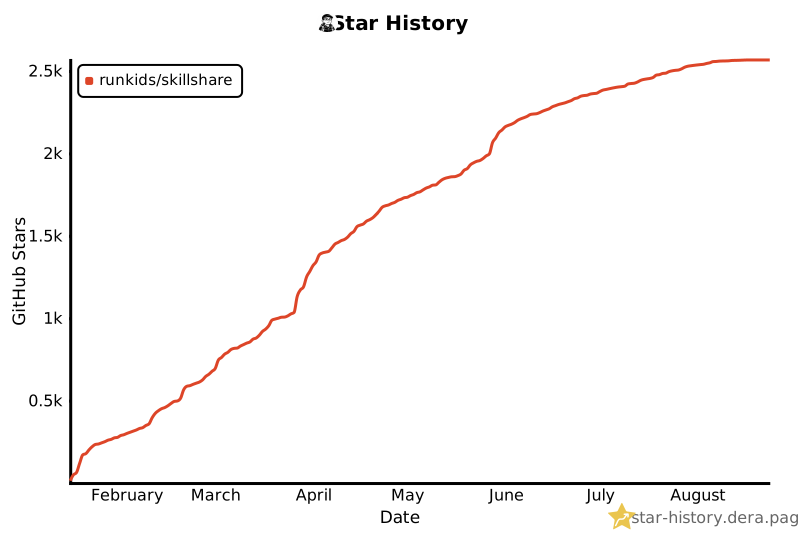](https://star-history.dera.page/#runkids/skillshare&type=date&legend=top-left)
|
||
|
||
---
|
||
|
||
## ライセンス
|
||
|
||
MIT
|