mirror of
https://github.com/runkids/skillshare.git
synced 2026-11-20 20:34:19 +00:00
 Willie
684b0da971
- Add v0.15.4 CHANGELOG entry (audit gate, content hash pinning, --diff,
  source-repository-link rule, severity-based risk floor, bug fixes)
- Bump SKILL.md version to v0.15.4 with supply-chain security keywords
- Update README Recent Updates table to reference v0.15.4
- Fix security.md rule count 25→31 to match audit.md
- DashboardPage: include blocked count in update summary toast
- SkillDetailPage: show ConfirmDialog on blocked update with
  "Skip Audit & Update" retry option
455 lines
20 KiB
Markdown
455 lines
20 KiB
Markdown
<p align="center" style="margin-bottom: 0;">
|
|
<img src=".github/assets/logo.png" alt="skillshare" width="280">
|
|
</p>
|
|
|
|
<h1 align="center" style="margin-top: 0.5rem; margin-bottom: 0.5rem;">skillshare</h1>
|
|
|
|
<p align="center">
|
|
<a href="https://skillshare.runkids.cc"><img src="https://img.shields.io/badge/Website-skillshare.runkids.cc-blue?logo=docusaurus" alt="Website"></a>
|
|
<a href="LICENSE"><img src="https://img.shields.io/badge/License-MIT-yellow.svg" alt="License: MIT"></a>
|
|
<a href="go.mod"><img src="https://img.shields.io/github/go-mod/go-version/runkids/skillshare" alt="Go Version"></a>
|
|
<a href="https://github.com/runkids/skillshare/releases"><img src="https://img.shields.io/github/v/release/runkids/skillshare" alt="Release"></a>
|
|
<img src="https://img.shields.io/badge/platform-macOS%20%7C%20Linux%20%7C%20Windows-blue" alt="Platform">
|
|
<a href="https://goreportcard.com/report/github.com/runkids/skillshare"><img src="https://goreportcard.com/badge/github.com/runkids/skillshare" alt="Go Report Card"></a>
|
|
<a href="https://deepwiki.com/runkids/skillshare"><img src="https://deepwiki.com/badge.svg" alt="Ask DeepWiki"></a>
|
|
</p>
|
|
|
|
<p align="center">
|
|
<a href="https://github.com/runkids/skillshare/stargazers"><img src="https://img.shields.io/github/stars/runkids/skillshare?style=social" alt="Star on GitHub"></a>
|
|
</p>
|
|
|
|
<p align="center">
|
|
<strong>One source of truth for AI CLI skills. Sync everywhere with one command — from personal to organization-wide.</strong><br>
|
|
Claude Code, OpenClaw, OpenCode & 49+ more.
|
|
</p>
|
|
|
|
<p align="center">
|
|
<img src=".github/assets/demo.gif" alt="skillshare demo" width="960">
|
|
</p>
|
|
|
|
<p align="center">
|
|
<a href="https://skillshare.runkids.cc">Website</a> •
|
|
<a href="#installation">Install</a> •
|
|
<a href="#quick-start">Quick Start</a> •
|
|
<a href="#cli-and-ui-preview">Screenshots</a> •
|
|
<a href="#common-workflows">Commands</a> •
|
|
<a href="#web-dashboard">Web UI</a> •
|
|
<a href="#project-skills-per-repo">Project Skills</a> •
|
|
<a href="#organization-skills-tracked-repo">Organization Skills</a> •
|
|
<a href="#skill-hub">Hub</a> •
|
|
<a href="https://skillshare.runkids.cc/docs">Docs</a>
|
|
</p>
|
|
|
|
> [!NOTE]
|
|
> **Recent Updates**
|
|
> | Version | Highlights |
|
|
> |---------|------------|
|
|
> | [0.15.x](https://github.com/runkids/skillshare/releases/tag/v0.15.4) | Supply-chain security (auto-audit gate with rollback, content hash pinning, `--diff` for `update`), copy sync mode, HTTPS token auth, multi-name `audit` with `--group` |
|
|
> | [0.14.0](https://github.com/runkids/skillshare/releases/tag/v0.14.0) | Global skill manifest, `.skillignore`, multi-skill/group uninstall, license display, 6 new audit rules |
|
|
> | [0.13.0](https://github.com/runkids/skillshare/releases/tag/v0.13.0) | Skill-level targets, XDG compliance, unified target names, runtime UI download |
|
|
> | [0.12.0](https://github.com/runkids/skillshare/releases/tag/v0.12.0) | Skill Hub — generate indexes, search private catalogs with `--hub` |
|
|
|
|
## Why skillshare
|
|
|
|
Stop managing skills tool-by-tool.
|
|
`skillshare` gives you one shared skill source and pushes it everywhere your AI agents work.
|
|
|
|
- **One command, everywhere**: Sync to Claude Code, Codex, Cursor, OpenCode, and more with `skillshare sync`.
|
|
- **Safe by default**: Non-destructive merge mode keeps CLI-local skills intact while sharing team skills.
|
|
- **True bidirectional flow**: Pull skills back from targets with `collect` so improvements never get trapped in one tool.
|
|
- **Cross-machine ready**: Git-native `push`/`pull` keeps all your devices aligned.
|
|
- **Team + project friendly**: Use global skills for personal workflows and `.skillshare/` for repo-scoped collaboration.
|
|
- **Folder-friendly**: Organize skills in folders (e.g. `frontend/react/`) — auto-flattened to flat names on sync.
|
|
- **Privacy-first**: No central registry, no telemetry, no install tracking. Your skill setup stays entirely local.
|
|
- **Built-in security audit**: Scan skills for prompt injection, data exfiltration, and other threats before they reach your AI agent.
|
|
- **Visual control panel**: Open `skillshare ui` for browsing, install, target management, and sync status in one place.
|
|
|
|
## Comparison
|
|
|
|
skillshare uses a **declarative** approach: define your targets once in `config.yaml`, then `sync` handles everything — no prompts, no repeated selections.
|
|
|
|
| | Imperative (install-per-command) | Declarative (skillshare) |
|
|
|---|---|---|
|
|
| **Config** | No config; prompts every run | `config.yaml` — set once |
|
|
| **Agent selection** | Interactive prompt each time | Defined in config |
|
|
| **Install method** | Choose per operation | `sync_mode` in config |
|
|
| **Source of truth** | Skills copied independently | Single source → symlinks (or copies) |
|
|
| **Remove one agent's skill** | May break other agents' symlinks | Only that target's symlink removed |
|
|
| **New machine setup** | Re-run every install manually | `git clone` config + `sync` |
|
|
| **Project-scoped skills** | Global lock file only | `init -p` for per-repo skills |
|
|
| **Cross-machine sync** | Manual | Built-in `push` / `pull` |
|
|
| **Bidirectional** | Install only | `collect` pulls changes back |
|
|
| **Security audit** | None | Built-in `audit` + auto-scan on install |
|
|
| **Web dashboard** | None | `skillshare ui` |
|
|
| **Runtime dependency** | Node.js + npm | None (single Go binary) |
|
|
|
|
> [!TIP]
|
|
> Coming from another tool? See the [Migration Guide](https://skillshare.runkids.cc/docs/guides/migration) and [detailed comparison](https://skillshare.runkids.cc/docs/guides/comparison).
|
|
|
|
## How It Works
|
|
- macOS / Linux: `~/.config/skillshare/skills/`
|
|
- Windows: `%AppData%\skillshare\skills\`
|
|
|
|
```
|
|
┌─────────────────────────────────────────────────────────────┐
|
|
│ Source Directory │
|
|
│ ~/.config/skillshare/skills/ │
|
|
└─────────────────────────────────────────────────────────────┘
|
|
│ sync
|
|
┌───────────────┼───────────────┐
|
|
▼ ▼ ▼
|
|
┌───────────┐ ┌───────────┐ ┌───────────┐
|
|
│ Claude │ │ OpenCode │ │ OpenClaw │ ...
|
|
└───────────┘ └───────────┘ └───────────┘
|
|
```
|
|
|
|
| Platform | Source Path | Link Type |
|
|
|----------|-------------|-----------|
|
|
| macOS/Linux | `~/.config/skillshare/skills/` | Symlinks |
|
|
| Windows | `%AppData%\skillshare\skills\` | NTFS Junctions (no admin required) |
|
|
|
|
> Targets that can't follow symlinks? Use `skillshare target <name> --mode copy` to sync as real files instead.
|
|
|
|
> [!TIP]
|
|
> Skills can be organized in folders (e.g. `frontend/react/react-best-practices/`) — they're auto-flattened on sync. See the [Organizing Guide](https://skillshare.runkids.cc/docs/guides/organizing-skills) and [runkids/my-skills](https://github.com/runkids/my-skills) for a real-world example.
|
|
|
|
|
|
## CLI and UI Preview
|
|
|
|
### CLI
|
|
|
|
| Sync | Install + Audit |
|
|
|---|---|
|
|
| <img src=".github/assets/sync-collision-demo.png" alt="CLI sync output" width="480" height="280" style="object-fit: cover;"> | <img src=".github/assets/install-with-audio-demo.png" alt="CLI install with security audit" width="480" height="280" style="object-fit: cover;"> |
|
|
|
|
### UI
|
|
|
|
| Dashboard | Security Audit |
|
|
|---|---|
|
|
| <img src=".github/assets/ui/web-dashboard-demo.png" alt="Web dashboard overview" width="480" height="280" style="object-fit: cover;"> | <img src=".github/assets/ui/web-audit-demo.png" alt="Web UI security audit" width="480" height="280" style="object-fit: cover;"> |
|
|
|
|
## Installation
|
|
|
|
### macOS / Linux
|
|
|
|
```bash
|
|
curl -fsSL https://raw.githubusercontent.com/runkids/skillshare/main/install.sh | sh
|
|
```
|
|
|
|
### Windows PowerShell
|
|
|
|
```powershell
|
|
irm https://raw.githubusercontent.com/runkids/skillshare/main/install.ps1 | iex
|
|
```
|
|
|
|
### Homebrew
|
|
|
|
```bash
|
|
brew install skillshare
|
|
```
|
|
|
|
> **Note:** All install methods include the web dashboard. `skillshare ui` automatically downloads UI assets on first launch — no extra setup needed.
|
|
|
|
> **Tip:** To update to the latest version, run `skillshare upgrade`. It auto-detects your install method (Homebrew, manual, etc.) and handles the rest.
|
|
|
|
### Shorthand (Optional)
|
|
|
|
Add an alias to your shell config (`~/.zshrc` or `~/.bashrc`):
|
|
|
|
```bash
|
|
alias ss='skillshare'
|
|
```
|
|
|
|
### Uninstall
|
|
|
|
```bash
|
|
# macOS/Linux
|
|
brew uninstall skillshare # Homebrew
|
|
sudo rm /usr/local/bin/skillshare # Manual install
|
|
rm -rf ~/.config/skillshare # Config & skills (optional)
|
|
rm -rf ~/.local/share/skillshare # Backups & trash (optional)
|
|
rm -rf ~/.local/state/skillshare # Logs (optional)
|
|
rm -rf ~/.cache/skillshare # UI & version cache (optional)
|
|
|
|
# Windows (PowerShell)
|
|
Remove-Item "$env:LOCALAPPDATA\Programs\skillshare" -Recurse -Force
|
|
Remove-Item "$env:APPDATA\skillshare" -Recurse -Force # optional
|
|
```
|
|
|
|
---
|
|
|
|
## Quick Start
|
|
|
|
```bash
|
|
skillshare init --dry-run # Preview setup
|
|
skillshare init # Create config, source, and detected targets
|
|
skillshare sync # Sync skills to all targets
|
|
```
|
|
|
|
## Common Workflows
|
|
|
|
### Daily Commands
|
|
|
|
| Command | What it does |
|
|
|---------|---------------|
|
|
| `skillshare list` | List skills in source |
|
|
| `skillshare status` | Show sync status for all targets |
|
|
| `skillshare sync` | Sync source skills to all targets |
|
|
| `skillshare diff` | Preview differences before syncing |
|
|
| `skillshare doctor` | Diagnose config/environment issues |
|
|
| `skillshare new <name>` | Create a new skill template |
|
|
| `skillshare install [source]` | Install skill from source, or all skills from config (no args) |
|
|
| `skillshare collect [target]` | Import skills from target(s) back to source |
|
|
| `skillshare update <name>` | Update one installed skill/repo |
|
|
| `skillshare update --all` | Update all tracked repos |
|
|
| `skillshare uninstall <name>... [-G <group>]` | Remove skill(s) or groups from source |
|
|
| `skillshare audit [name]` | Scan skills for security threats |
|
|
| `skillshare log` | View operations and audit logs for debugging and compliance |
|
|
| `skillshare search <query>` | Search installable skills on GitHub |
|
|
| `skillshare search --hub [url]` | Search a hub index (default: skillshare-hub) |
|
|
| `skillshare hub index` | Generate a hub index from installed skills |
|
|
|
|
`skillshare search` requires GitHub auth (`gh auth login`) or `GITHUB_TOKEN`. The `--hub` flag searches a JSON index instead — without a URL it defaults to the public [skillshare-hub](https://github.com/runkids/skillshare-hub).
|
|
|
|
### Target Management
|
|
|
|
```bash
|
|
skillshare target list
|
|
skillshare target add my-tool ~/.my-tool/skills
|
|
skillshare target remove my-tool
|
|
```
|
|
|
|
### Backup and Restore
|
|
|
|
```bash
|
|
skillshare backup
|
|
skillshare backup --list
|
|
skillshare restore <target>
|
|
```
|
|
|
|
### Cross-machine Git Sync
|
|
|
|
```bash
|
|
skillshare push
|
|
skillshare pull
|
|
```
|
|
|
|
### Project Skills (Per Repo)
|
|
|
|
```bash
|
|
skillshare init -p
|
|
skillshare new my-skill -p
|
|
skillshare install anthropics/skills/skills/pdf -p
|
|
skillshare install github.com/team/skills --track -p
|
|
skillshare sync
|
|
```
|
|
|
|
Project mode keeps skills in `.skillshare/skills/` so they can be committed and shared with the repo. In both global and project mode, `config.yaml` acts as a **portable skill manifest** — run `skillshare install` with no arguments to install all listed skills:
|
|
|
|
```bash
|
|
# Global — new machine setup
|
|
skillshare install # Installs all skills from ~/.config/skillshare/config.yaml
|
|
skillshare sync
|
|
|
|
# Project — new team member onboarding
|
|
git clone github.com/your/project && cd project
|
|
skillshare install -p # Installs all skills from .skillshare/config.yaml
|
|
skillshare sync
|
|
```
|
|
|
|
### Organization Skills (Tracked Repo)
|
|
|
|
```bash
|
|
skillshare install github.com/team/skills --track
|
|
skillshare update _team-skills
|
|
skillshare sync
|
|
```
|
|
|
|
## Skill Hub
|
|
|
|
Build a searchable skill catalog for your organization — no GitHub API required.
|
|
|
|
```bash
|
|
skillshare hub index # Generate index from installed skills
|
|
skillshare search --hub # Browse the public skillshare-hub
|
|
skillshare search react --hub # Search "react" in skillshare-hub
|
|
skillshare search --hub ./skillshare-hub.json react # Search custom local index
|
|
skillshare search --hub https://example.com/hub.json # Search custom remote index
|
|
```
|
|
|
|
The generated `skillshare-hub.json` follows a versioned schema (`schemaVersion: 1`) with support for tags and multi-skill repos. Host it on any static server, internal CDN, or commit it alongside your skills repo.
|
|
|
|
The public hub at [runkids/skillshare-hub](https://github.com/runkids/skillshare-hub) is the built-in default. Fork it to bootstrap your organization's internal hub — CI validation and `skillshare audit` security scans are included out of the box.
|
|
|
|
> [!TIP]
|
|
> See the [Hub Index Guide](https://skillshare.runkids.cc/docs/guides/hub-index) for schema details and hosting options.
|
|
|
|
## Web Dashboard
|
|
|
|
```bash
|
|
skillshare ui # Global mode
|
|
skillshare ui -p # Project mode (manages .skillshare/)
|
|
```
|
|
|
|
- Opens `http://127.0.0.1:19420`
|
|
- Requires `skillshare init` (or `init -p` for project mode) first
|
|
- Auto-detects project mode when `.skillshare/config.yaml` exists
|
|
- UI assets are downloaded on first launch (~1 MB), then cached offline at `~/.cache/skillshare/ui/`
|
|
|
|
For containers/remote hosts:
|
|
|
|
```bash
|
|
skillshare ui --host 0.0.0.0 --no-open
|
|
```
|
|
|
|
Then access: `http://localhost:19420`
|
|
|
|
## Security Audit
|
|
|
|
Scan installed skills for prompt injection, data exfiltration, credential theft, and other threats before they reach your AI agent.
|
|
|
|
```bash
|
|
skillshare audit # Scan all skills
|
|
skillshare audit <name> # Scan a specific skill
|
|
```
|
|
|
|
Skills are also scanned automatically during `skillshare install`.
|
|
|
|
- `skillshare install` runs an audit by default.
|
|
- Block threshold is configurable with `audit.block_threshold` (`CRITICAL` default; also supports `HIGH`, `MEDIUM`, `LOW`, `INFO`).
|
|
- `audit.block_threshold` only controls blocking level; it does **not** disable scanning.
|
|
- There is no config flag to permanently skip audit. To bypass a single install, use `--skip-audit`.
|
|
- Use `--force` to override blocked installs while still running audit (findings remain visible).
|
|
- Use `--skip-audit` to bypass scanning for a single install command.
|
|
- If both are set, `--skip-audit` takes precedence in practice (audit is not executed).
|
|
|
|
> [!TIP]
|
|
> See the [Securing Your Skills](https://skillshare.runkids.cc/docs/guides/security) guide for a complete security workflow, or the [audit command reference](https://skillshare.runkids.cc/docs/commands/audit) for the full list of detection patterns.
|
|
|
|
## Docker
|
|
|
|
Use Docker for reproducible testing, interactive playgrounds, and production deployment.
|
|
|
|
### Test pipeline
|
|
|
|
```bash
|
|
make test-docker # offline sandbox (build + unit + integration)
|
|
```
|
|
|
|
### Interactive playground
|
|
|
|
```bash
|
|
make playground # start + enter shell (one step)
|
|
make playground-down # stop and remove
|
|
|
|
# Advanced sandbox management:
|
|
./scripts/sandbox.sh <up|down|shell|reset|status|logs|bare>
|
|
```
|
|
|
|
Inside the playground:
|
|
|
|
```bash
|
|
skillshare status # global mode (pre-initialized)
|
|
skillshare list # see flat + nested skills
|
|
skillshare-ui # start global-mode dashboard (:19420)
|
|
|
|
# Project mode (pre-configured demo project)
|
|
cd ~/demo-project
|
|
skillshare status # auto-detects project mode
|
|
skillshare-ui-p # project mode dashboard (:19420)
|
|
```
|
|
|
|
### Dev profile
|
|
|
|
```bash
|
|
# With Go installed locally (single command):
|
|
make ui-dev # Go API server + Vite HMR together
|
|
|
|
# Without Go (API in Docker):
|
|
make dev-docker # Go API server in Docker (:19420)
|
|
cd ui && pnpm run dev # Vite dev server on host (:5173)
|
|
make dev-docker-down # stop when done
|
|
```
|
|
|
|
### Production image
|
|
|
|
```bash
|
|
make docker-build # build production image
|
|
make docker-build-multiarch # build for amd64 + arm64
|
|
```
|
|
|
|
Pre-built images are published to [GitHub Packages](https://github.com/runkids/skillshare/pkgs/container/skillshare) on each release.
|
|
|
|
## Development
|
|
|
|
**Recommended:** Open in [Dev Containers](https://containers.dev/) — Go toolchain, Node.js, pnpm, and demo content are pre-configured. All dev servers (API, Vite, Docusaurus) start automatically.
|
|
|
|
```bash
|
|
make build # build binary
|
|
make test # unit + integration tests
|
|
make lint # go vet
|
|
make fmt # format Go files
|
|
make check # fmt + lint + test
|
|
make ui-dev # Go API server + Vite HMR together
|
|
make build-all # frontend + Go binary
|
|
```
|
|
|
|
## Documentation
|
|
|
|
- Docs home: https://skillshare.runkids.cc/docs/
|
|
- Commands: https://skillshare.runkids.cc/docs/commands
|
|
- Guides: https://skillshare.runkids.cc/docs/guides/
|
|
- Troubleshooting: https://skillshare.runkids.cc/docs/troubleshooting/faq
|
|
|
|
## Contributing
|
|
|
|
Contributions are welcome! Here's the recommended workflow:
|
|
|
|
1. **Open an issue first** — describe what you'd like to change and why. This helps align on scope and approach before writing code.
|
|
2. **Submit a draft PR** — if you'd like to propose an implementation, open a [draft pull request](https://docs.github.com/en/pull-requests/collaborating-with-pull-requests/proposing-changes-to-your-work-with-pull-requests/about-pull-requests#draft-pull-requests) and link it to the issue. Draft PRs let us collaborate on the approach early, before investing time in polish.
|
|
3. **Include tests** — PRs that include test coverage are much easier to review and merge. Run `make check` (format + lint + test) to verify before submitting.
|
|
|
|
```bash
|
|
git clone https://github.com/runkids/skillshare.git
|
|
cd skillshare
|
|
make check # format + lint + test (must pass)
|
|
```
|
|
|
|
Or open in [Dev Containers](https://containers.dev/) for a zero-setup environment.
|
|
|
|
> [!TIP]
|
|
> Not sure where to start? Browse [open issues](https://github.com/runkids/skillshare/issues) or open a new one to discuss your idea.
|
|
|
|
## Contributors
|
|
|
|
Thanks to everyone who helped shape skillshare through issues, PRs, and ideas.
|
|
|
|
<a href="https://github.com/leeeezx"><img src="https://github.com/leeeezx.png" width="40" height="40" alt="leeeezx"></a>
|
|
<a href="https://github.com/xocasdashdash"><img src="https://github.com/xocasdashdash.png" width="40" height="40" alt="xocasdashdash"></a>
|
|
<a href="https://github.com/romanr"><img src="https://github.com/romanr.png" width="40" height="40" alt="romanr"></a>
|
|
<a href="https://github.com/philippe-granet"><img src="https://github.com/philippe-granet.png" width="40" height="40" alt="philippe-granet"></a>
|
|
<a href="https://github.com/terranc"><img src="https://github.com/terranc.png" width="40" height="40" alt="terranc"></a>
|
|
<a href="https://github.com/benrfairless"><img src="https://github.com/benrfairless.png" width="40" height="40" alt="benrfairless"></a>
|
|
<a href="https://github.com/nerveband"><img src="https://github.com/nerveband.png" width="40" height="40" alt="nerveband"></a>
|
|
<a href="https://github.com/EarthChen"><img src="https://github.com/EarthChen.png" width="40" height="40" alt="EarthChen"></a>
|
|
<a href="https://github.com/gdm257"><img src="https://github.com/gdm257.png" width="40" height="40" alt="gdm257"></a>
|
|
<a href="https://github.com/skovtunenko"><img src="https://github.com/skovtunenko.png" width="40" height="40" alt="skovtunenko"></a>
|
|
<a href="https://github.com/TyceHerrman"><img src="https://github.com/TyceHerrman.png" width="40" height="40" alt="TyceHerrman"></a>
|
|
<a href="https://github.com/1am2syman"><img src="https://github.com/1am2syman.png" width="40" height="40" alt="1am2syman"></a>
|
|
<a href="https://github.com/thealokkr"><img src="https://github.com/thealokkr.png" width="40" height="40" alt="thealokkr"></a>
|
|
<a href="https://github.com/njg7194"><img src="https://github.com/njg7194.png" width="40" height="40" alt="njg7194"></a>
|
|
|
|
---
|
|
|
|
If you find skillshare useful, consider giving it a ⭐
|
|
|
|
## Star History
|
|
|
|
[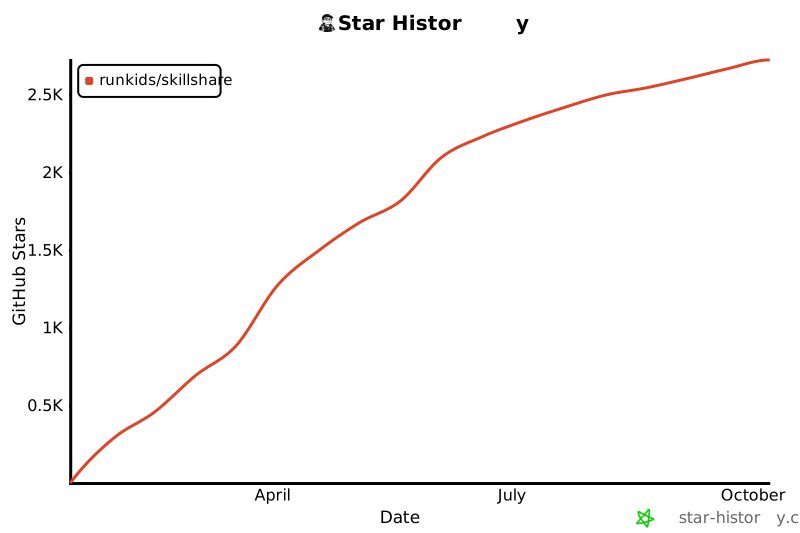](https://www.star-history.com/#runkids/skillshare&type=date&legend=top-left)
|
|
|
|
---
|
|
|
|
## License
|
|
|
|
MIT
|