

SkillKit


The universal skills platform for AI coding agents. Install, manage, translate, and sync skills across 17+ AI tools with smart recommendations.
npm install -g skillkit && skillkit
Why SkillKit?
| Problem | SkillKit Solution |
|---|---|
| Skills only work with one agent | Cross-agent translation - use any skill with any agent |
| Don't know which skills to install | Smart recommendations - project-aware suggestions |
| Config fragmented across agents | One config, all agents - sync everywhere |
| Manual skill discovery | Task-based search - find skills by what you need |
30-Second Quick Start
# Install globally
npm install -g skillkit

# Get personalized skill recommendations for your project
skillkit recommend

# Install top-rated skills
skillkit install anthropics/skills

# Launch interactive TUI
skillkit
Key Features
Smart Recommendations
Analyzes your project and suggests the best skills:
skillkit recommend
# Project: my-app (Next.js + TypeScript + Tailwind)
#
# Recommended Skills:
#   92% ██████████ vercel-react-best-practices
#   87% █████████░ tailwind-v4-patterns
#   85% █████████░ nextjs-app-router
Cross-Agent Translation
Use any skill with any agent - automatic format conversion:
# Translate a Claude skill to Cursor format
skillkit translate react-patterns --to cursor

# Translate all skills for a new agent
skillkit translate --all --to antigravity
Project Context Sync
Configure once, sync to all your agents:
# Analyze project and create context
skillkit context init

# Sync your config to all detected agents
skillkit context sync --all
Interactive TUI
Launch the beautiful terminal interface:
skillkit ui
# or simply
skillkit

Features:
- Browse 33+ skill repositories
- Smart skill recommendations based on your project
- Install skills with one keystroke
- Multi-agent installation support
- Cross-agent skill translation
- Responsive design for all terminal sizes
Navigation:
hHome |bBrowse |rRecommend |lList |sSync |,Config↑↓Navigate |EnterSelect |EscBack |qQuitmMulti-agent selection |/Search
Compatible With
| Agent | Status |
|---|---|
| Claude Code | ✅ Native |
| OpenAI Codex | ✅ Native |
| Cursor | ✅ Native |
| Gemini CLI | ✅ Native |
| OpenCode | ✅ Native |
| Antigravity | ✅ Native |
| Amp | ✅ Native |
| Clawdbot | ✅ Native |
| Droid (Factory) | ✅ Native |
| GitHub Copilot | ✅ Native |
| Goose | ✅ Native |
| Kilo Code | ✅ Native |
| Kiro CLI | ✅ Native |
| Roo Code | ✅ Native |
| Trae | ✅ Native |
| Windsurf | ✅ Native |
| Any markdown-config agent | ✅ Universal |
Features
- Smart Recommendations: AI-powered skill suggestions based on your project stack
- Cross-Agent Translation: Convert skills between any of 17+ agent formats
- Project Context Sync: One config that syncs to all your agents
- Interactive TUI: Beautiful terminal interface for managing skills
- Multi-Agent Support: Works with Claude Code, Cursor, Codex, Windsurf, and 13+ more
- Multi-Platform Git: GitHub, GitLab, Bitbucket, and local paths
- CI/CD Friendly: Non-interactive flags for automation (
--skills,--all,--yes) - Zero Config: Auto-detects your agent and configures appropriately
Installation
# Global install (recommended)
npm install -g skillkit

# Or use without installing
npx skillkit <command>

# Or with other package managers
pnpm add -g skillkit
yarn global add skillkit
bun add -g skillkit
Quick Start
# 1. Get recommendations for your project
skillkit recommend

# 2. Install recommended skills
skillkit install anthropics/skills

# 3. Sync to your agent
skillkit sync

# Or just launch the TUI and do it all interactively
skillkit
Popular Skill Repositories
Install skills from these community repositories:
# Anthropic's official skill marketplace
skillkit install anthropics/skills

# Vercel's React & Next.js best practices
skillkit install vercel-labs/agent-skills/skills
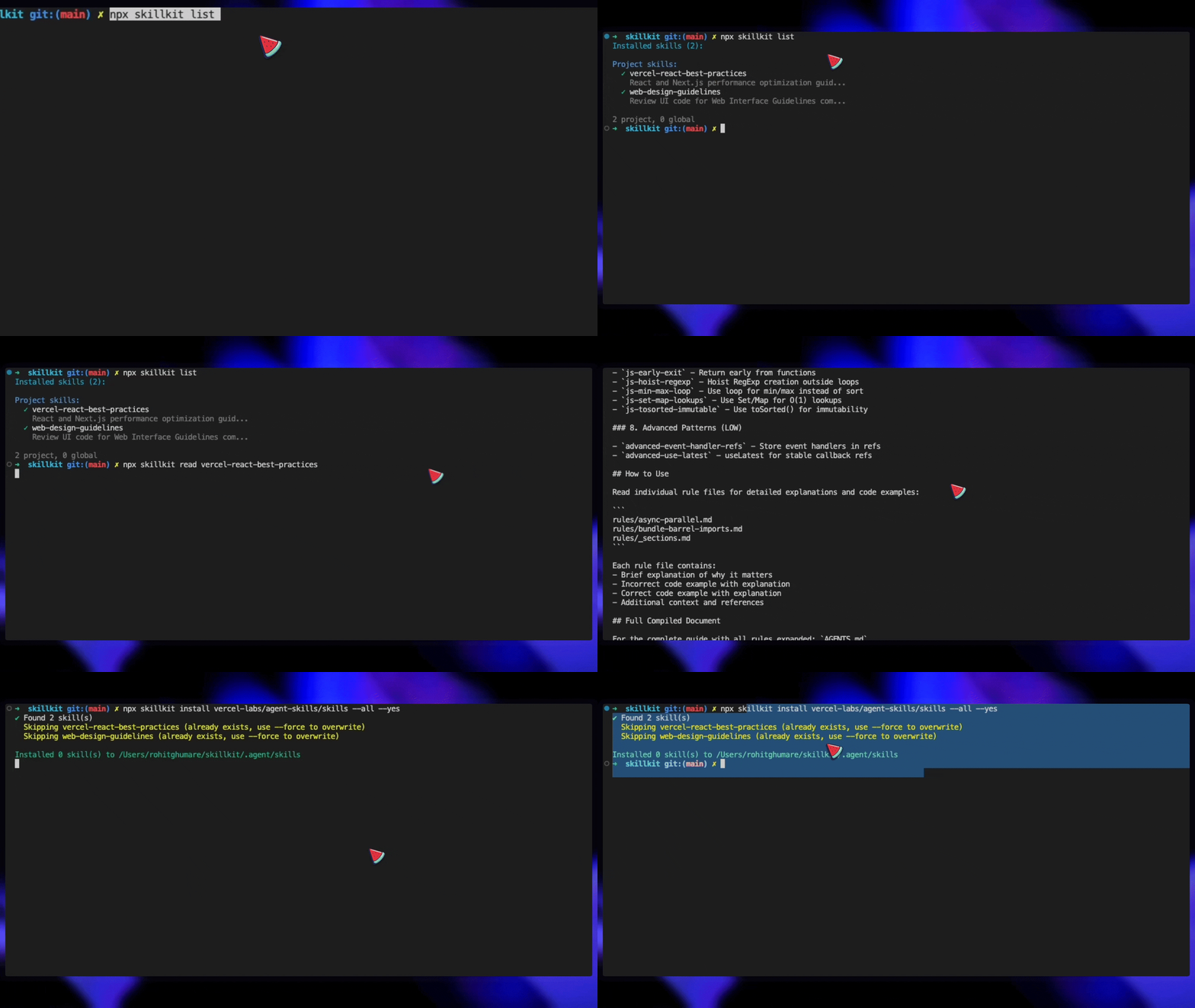
| Repository | Skills | Description |
|---|---|---|
| anthropics/skills | pdf, xlsx, docx, etc. |
Official Claude Code skill marketplace |
| vercel-labs/agent-skills | vercel-react-best-practices, web-design-guidelines |
React/Next.js optimization & UI review |
Commands
skillkit ui / skillkit
Launch the interactive Terminal User Interface (TUI) for managing skills.
skillkit ui          # Explicit TUI launch
skillkit             # Launch TUI if no arguments provided
TUI Features:
- Browse: Discover skills from 33+ repositories
- Recommend: Get smart skill suggestions for your project
- List: View all installed skills
- Sync: Sync skills across multiple agents
- Settings: Configure SkillKit preferences
Keyboard Shortcuts:
h- Home screenb- Browse skills marketplacer- Smart recommendationsl- List installed skillss- Sync skills across agents,- Settings↑↓- Navigate listsEnter- Select / Installm- Multi-agent selection (when viewing skills)/- Search skillsEsc- Return to homeq- Quit
skillkit install <source>
Install skills from various sources.
# GitHub (default)
skillkit install owner/repo
skillkit install https://github.com/owner/repo

# Install from a subdirectory
skillkit install owner/repo/skills

# GitLab
skillkit install gitlab:owner/repo
skillkit install https://gitlab.com/owner/repo

# Bitbucket
skillkit install bitbucket:owner/repo

# Local path
skillkit install ./my-skills
skillkit install ~/dev/skills

# Options
--list               # List available skills without installing
--skills=pdf,xlsx    # Install specific skills only (CI/CD)
--all                # Install all discovered skills
--yes                # Skip confirmation prompts
--global             # Install to global directory
--force              # Overwrite existing skills
--provider=gitlab    # Force specific provider
--agent=cursor       # Install to specific agent (can specify multiple)
skillkit sync
Sync installed skills to your agent's config file.
skillkit sync
skillkit sync --agent cursor
skillkit sync --output AGENTS.md
skillkit sync --enabled-only
skillkit recommend
Get smart skill recommendations based on your project's tech stack.
skillkit recommend                    # Analyze current directory
skillkit recommend --path ./my-app    # Analyze specific project
skillkit recommend --verbose          # Show detailed match reasons
skillkit recommend --limit 5          # Limit results
skillkit recommend --min-score 50     # Only show high matches
skillkit recommend --category security # Filter by category
skillkit recommend --search "auth"    # Search skills by task
skillkit recommend --update           # Update skill index
skillkit recommend --json             # Output as JSON
skillkit translate
Translate skills between different agent formats.
skillkit translate react-skill --to cursor      # Translate to Cursor format
skillkit translate ./skill --from claude --to windsurf  # Explicit source/target
skillkit translate --all --to cursor            # Translate all installed skills
skillkit translate react-skill --to cursor --dry-run    # Preview without writing
Supported translations: All 17 agents can translate to/from each other.
skillkit context
Manage project context for cross-agent synchronization.
skillkit context init                 # Analyze project and create context
skillkit context show                 # Display current context
skillkit context export               # Export context to file
skillkit context import ./context.yaml # Import context from file
skillkit context sync --agent cursor  # Sync context to specific agent
skillkit context sync --all           # Sync to all detected agents
skillkit read <skills>
Read skill content for AI agent consumption.
skillkit read pdf
skillkit read pdf,xlsx,docx    # Multiple skills
skillkit list
List all installed skills.
skillkit list
skillkit list --enabled
skillkit list --json
skillkit enable/disable <skills>
Toggle skills on/off without removing them.
skillkit enable pdf xlsx
skillkit disable docx
skillkit update [skills]
Update skills from their original sources.
skillkit update          # Update all
skillkit update pdf xlsx # Update specific
skillkit remove <skills>
Remove installed skills.
skillkit remove pdf xlsx
skillkit init
Initialize skillkit in a project.
skillkit init
skillkit init --agent cursor
skillkit init --list    # List supported agents
skillkit validate <path>
Validate skills against the Agent Skills specification.
skillkit validate ./my-skill        # Validate single skill
skillkit validate ./skills --all    # Validate all skills in directory
skillkit create <skill-name>
Create a new skill with proper structure and template.
skillkit create my-skill                    # Basic skill
skillkit create my-skill --full             # Include all directories (references, scripts, assets)
skillkit create my-skill --scripts          # Include scripts directory
skillkit create my-skill --references       # Include references directory
skillkit create my-skill --assets           # Include assets directory
skillkit create my-skill --dir ./skills     # Create in specific directory
Supported Agents
| Agent | Config File | Project Path | Global Path |
|---|---|---|---|
| Claude Code | AGENTS.md |
.claude/skills/ |
~/.claude/skills/ |
| Cursor | .cursorrules |
.cursor/skills/ |
~/.cursor/skills/ |
| Codex | AGENTS.md |
.codex/skills/ |
~/.codex/skills/ |
| Gemini CLI | GEMINI.md |
.gemini/skills/ |
~/.gemini/skills/ |
| OpenCode | AGENTS.md |
.opencode/skills/ |
~/.config/opencode/skills/ |
| Antigravity | AGENTS.md |
.antigravity/skills/ |
~/.gemini/antigravity/skills/ |
| Amp | AGENTS.md |
.agents/skills/ |
~/.config/agents/skills/ |
| Clawdbot | AGENTS.md |
skills/ |
~/.clawdbot/skills/ |
| Droid (Factory) | AGENTS.md |
.factory/skills/ |
~/.factory/skills/ |
| GitHub Copilot | AGENTS.md |
.github/skills/ |
~/.copilot/skills/ |
| Goose | AGENTS.md |
.goose/skills/ |
~/.config/goose/skills/ |
| Kilo Code | AGENTS.md |
.kilocode/skills/ |
~/.kilocode/skills/ |
| Kiro CLI | AGENTS.md |
.kiro/skills/ |
~/.kiro/skills/ |
| Roo Code | AGENTS.md |
.roo/skills/ |
~/.roo/skills/ |
| Trae | AGENTS.md |
.trae/skills/ |
~/.trae/skills/ |
| Windsurf | AGENTS.md |
.windsurf/skills/ |
~/.codeium/windsurf/skills/ |
| Universal | AGENTS.md |
.agent/skills/ |
~/.agent/skills/ |
Creating Skills
Use skillkit create <name> to scaffold a new skill, or create manually:
A skill is a directory with a SKILL.md file:
my-skill/
├── SKILL.md           # Required: Instructions for the AI
├── references/        # Optional: Documentation
├── scripts/           # Optional: Helper scripts
└── assets/            # Optional: Templates, configs
SKILL.md Format
Follows the Agent Skills specification:
---
name: my-skill
description: What this skill does and when to use it. Include trigger keywords.
license: MIT
compatibility: Requires Node.js 18+
metadata:
  author: your-org
  version: "1.0"
---

# My Skill

Instructions for the AI agent on how to use this skill.

## When to Use

- Scenario 1
- Scenario 2

## Steps

1. First step
2. Second step
| Field | Required | Description |
|---|---|---|
name |
Yes | Lowercase alphanumeric with hyphens (max 64 chars) |
description |
Yes | What it does and when to use it (max 1024 chars) |
license |
No | License name or reference |
compatibility |
No | Environment requirements |
metadata |
No | Arbitrary key-value pairs |
CI/CD Usage
# GitHub Actions example
- name: Setup skills
  run: |
    npx skillkit install owner/skills --skills=lint,test,deploy --yes
    npx skillkit sync --yes
Programmatic API
import {
  // Skill discovery
  findAllSkills,
  discoverSkills,
  detectAgent,
  getAdapter,
  // Recommendations
  RecommendationEngine,
  analyzeProject,
  // Translation
  translateSkill,
  translateSkillFile,
  // Context
  ContextManager,
  initContext,
  syncToAllAgents,
} from 'skillkit';

// Find all installed skills
const skills = findAllSkills(searchDirs);

// Detect current agent
const agent = await detectAgent();

// Generate config
const adapter = getAdapter(agent);
const config = adapter.generateConfig(skills);

// Get smart recommendations
const engine = new RecommendationEngine();
const profile = await analyzeProject('./my-project');
const recommendations = engine.recommend(profile, skills);

// Translate skills between agents
const result = translateSkill(skillContent, 'cursor');
console.log(result.content); // Cursor MDC format

// Manage project context
const ctx = new ContextManager('./my-project');
await ctx.init();
await syncToAllAgents(ctx.getContext());
Configuration
Create skillkit.yaml in your project:
version: 1
agent: cursor           # Override auto-detection
autoSync: true          # Auto-sync on changes
enabledSkills:
  - pdf
  - xlsx
disabledSkills:
  - deprecated-skill
License
Apache License 2.0 - see LICENSE for details.
Contributing
Contributions welcome! Please read our Contributing Guidelines before submitting a pull request.
Acknowledgments
Implements the Agent Skills open format, originally developed by Anthropic and adopted by leading AI development tools.